Preventing friendly fire from Claude Code's YOLO mode: an agentic CrowdStrike automation powered by Tracecat
Reading time: ~9 min
Why I built this
Claude Code, alongside other agentic AI CLIs like OpenAI’s Codex CLI and Gemini CLI, has been gaining adoption rapidly. By default, these tools ask the user to confirm risky actions before running them: shell commands, file edits, network calls, and so on. Each tool also ships a flag to turn those prompts off entirely. For Claude Code that’s --dangerously-skip-permissions (or its longer cousin --allow-dangerously-skip-permissions), known informally as YOLO mode.
With the flag enabled, Claude can run arbitrary shell commands, write to any file, and read environment variables (including the API keys, tokens, and credentials present in the shell that spawned it) without asking. On a typical user’s machine, with cached cloud credentials, active SSO sessions, and writable disk, that is a wide blast radius from a single hallucinated command. Data exfiltration, persistence on disk, destructive file operations, and credential theft all become reachable from one bad model output.
This isn’t a Claude-specific problem. Codex CLI has --full-auto. Gemini CLI literally has --yolo. Cursor has its own auto-run mode. Every major AI CLI ships some variant of the same flag for the same reason: skip prompts in long agentic sessions. Every one of those flags carries the same risk.
The most effective way to prevent this is hard technical controls that block the user from being able to run the flag in the first place. Policy and documentation are necessary but not sufficient. The flag lives on the same CLI as the tool the user is already running, and the friction reduction is its whole point. If the technical control isn’t in place, the flag will get used.
This post is about a design pattern, not a one-off detection: use EDR to catch the moment a user reaches for an unsafe flag, block it at process-creation time, and use that moment of friction (the tool won’t run my command!) as a teaching opportunity rather than a blunt policy enforcement. Block at the endpoint, explain to the user in their DMs, give the security team a thread reply and a written case, and do it all in seconds.
The specific implementation in this post uses CrowdStrike Custom IOAs and Tracecat. The same shape works on any EDR that supports behavioural detection rules and webhook-based response, paired with any automation platform that can hold the workflow logic. If you don’t run CrowdStrike, see the adapting section further down for what slots in.
The Custom IOA I wrote detects the flag at process-creation time, blocks execution, and fires a Fusion webhook into a Tracecat workflow that:
- DMs the user with a calm, plain-English explanation of what just got blocked and why
- Replies in the Slack channel thread where you send CrowdStrike alerts so the security team has visibility
- Runs a CrowdStrike investigator agent against the detection (process tree, user history, related detections etc.)
- Creates a Tracecat case with everything documented end-to-end
The full workflow YAML and the IOA configuration are on GitHub: generalplantain/tracecat-workflows. This post is about the design choices and the human-side considerations, not the configuration mechanics. If you want to see exactly how each action is wired, the repo has the full definition.
Pre-requisites
You’ll need:
| Category | What you need | Notes |
|---|---|---|
| Tracecat | A running Tracecat instance | Self-hosted or cloud-hosted |
| CrowdStrike Falcon | Custom IOA rule created, plus Fusion SOAR for the webhook trigger | The Custom IOA fires at process creation; Fusion sends the detection JSON to a Tracecat webhook. |
| Slack app | A Slack app with chat:write, users:read, and users:read.email scopes, installed in your workspace |
Used for the user DM, the alert-channel thread replies, and the email-to-user-ID lookup. |
| Investigator preset agent | A Tracecat preset (e.g. crowdstrike-investigator-agent) with access to the Falcon tools, AbuseIPDB, and Slack posting |
This is the agent that runs the deeper investigation and posts findings as a thread reply. |
A few things worth calling out before you start clicking:
- Scope the Falcon API client tightly: the investigator agent only needs read access to detections, alerts, incidents, hosts, and Falcon Event Search.
- Email-to-Slack lookup needs the user’s corporate email to match Slack: the workflow constructs the email from the Falcon username (
${username}@yourcompany.com). If your users have different usernames in macOS vs Slack vs corporate email, you’ll need a lookup table or a tweak to the construction. - The Slack channel ID is hard-coded in the workflow: replace it in the YAML when you import it.
The CrowdStrike Custom IOA
A Custom IOA in CrowdStrike is a behavioural detection rule that runs at the EDR level. Custom IOAs fire on process behaviour: image filename, command line, parent process, file activity, registry, network. They can either alert (detect and report) or actively block process execution.
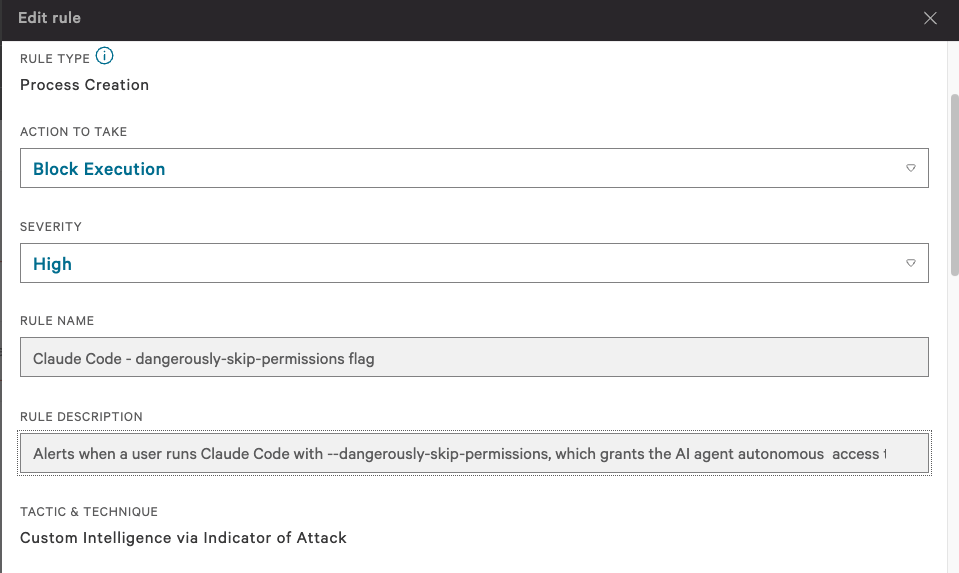
Mine matches the claude process with a command line containing --dangerously-skip-permissions:
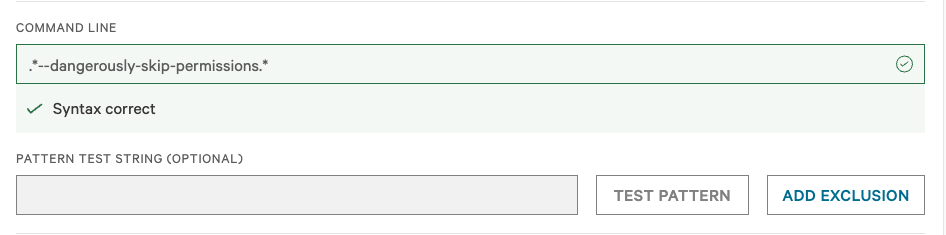
The pattern itself is a simple regex against the command line. The Falcon UI gives you a syntax-correct indicator and a test field, which is useful for not deploying a broken rule:
From the user’s side of the screen, the block looks like this. Claude exits before it can even print its splash text:

That’s the moment of friction we’re using as the teaching opportunity. By the time the user has finished reading “killed” and is wondering what just happened, the Tracecat workflow has already DMed them with the explanation.
A few things worth knowing before you write your own:
- Block Execution is a hard block. The user’s process won’t run. Claude Code exits with
zsh: killedin the terminal, as shown above. This is intentional, since the workflow’s job downstream is to explain why. If you don’t want to block (e.g. you’re rolling this out and want to observe first), set the action to Monitor, which just creates a detection without preventing execution. Severity: Highshows up in the user’s DM. I deliberately left this at High to convey to the user that this is something we genuinely care about, not just noise. Tune to your environment.- The regex shown is one approach, not the only one. I went with a loose form (
.*--dangerously-skip-permissions.*) for this rule. There are tighter and broader variants you can use depending on what you’re seeing in your environment, the tolerance for false positives, and how you want the rule to interact with other detections. Pick whatever matches the behaviour you’re trying to catch and the noise level you’re willing to live with. - Monitor what skip-permission flags your users actually reach for, and add rules for those too. This rule covers Claude Code. As your users adopt other agentic AI CLIs (Codex, Gemini CLI, Cursor, etc.) they’ll start hitting those permission-skip flags as well. Watch your endpoint telemetry for the equivalent invocations in your environment, then write per-CLI Custom IOAs for them. The detection logic, prompt-skip flags, and DM copy differ slightly across tools, so each one warrants its own rule rather than trying to catch them all with a single regex.
The Falcon Fusion trigger
CrowdStrike’s Fusion is the SOAR/workflow engine inside Falcon. I’m not using it for response logic (Tracecat handles that), only as the bridge that delivers detection events to my Tracecat webhook.
The Fusion workflow has three steps: trigger on Detection > EPP Detection, check that the Custom IOA rule matches mine, and on TRUE, Call webhook with the detection payload:
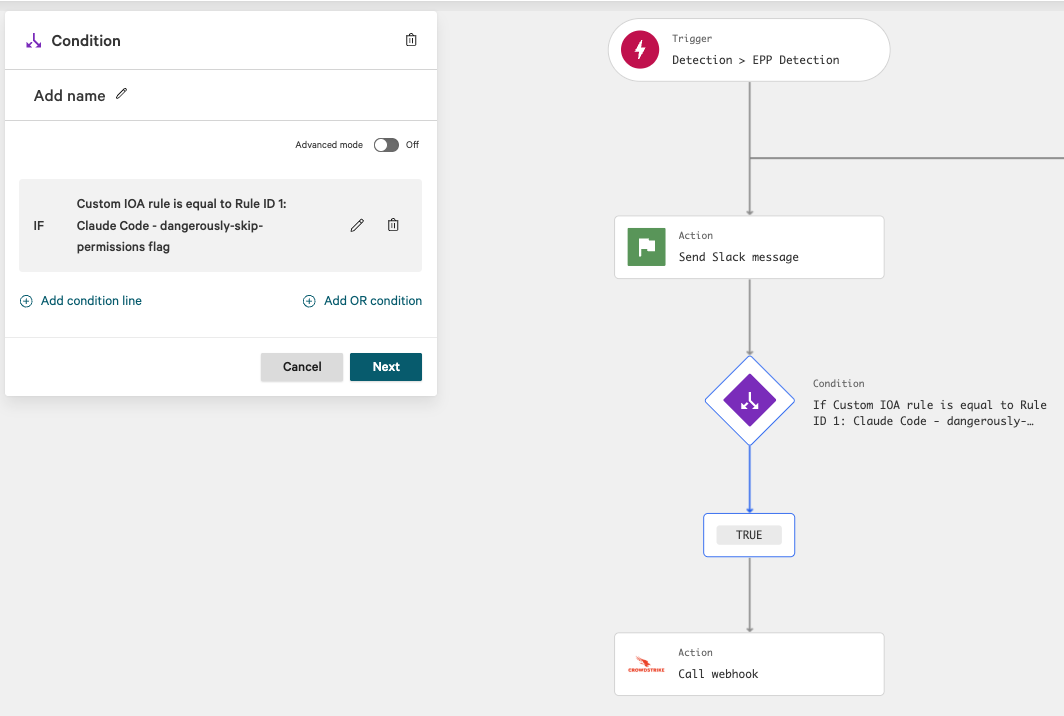
A couple of reasons to keep Fusion this thin:
- Falcon’s webhook step posts the full event JSON, including the process tree, command line, parent process, hostname, user, external IP, sensor metadata, etc. That’s everything Tracecat needs to do its job; no need to enrich on the Falcon side.
- All response logic lives in Tracecat, which means there’s one place to read when you’re debugging a misbehaving DM or thread reply. If half your logic is in Fusion and half is in Tracecat, you’ll regret it the first time something needs changing.
The Tracecat workflow at a glance
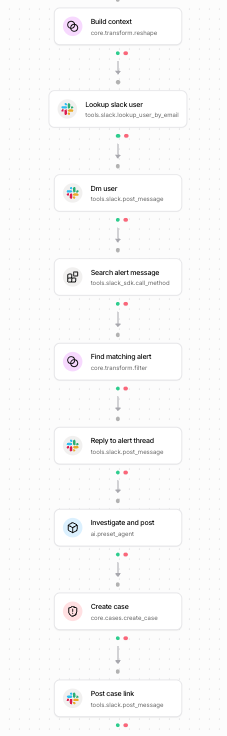
The action chain in dependency order:
| Ref | Action type | Job |
|---|---|---|
build_context |
core.transform.reshape |
Parse the Falcon webhook payload and extract the fields downstream actions need |
lookup_slack_user |
tools.slack.lookup_user_by_email |
Find the user’s Slack user ID from their email |
dm_user |
tools.slack.post_message |
Send the friendly DM to the user |
search_alert_message |
tools.slack_sdk.call_method |
Pull the last 10 messages from the Slack channel where CrowdStrike alerts are sent |
find_matching_alert |
core.transform.filter |
Filter to find the alert message for this specific host |
reply_to_alert_thread |
tools.slack.post_message |
Post the “user notified” reply in the alert thread |
investigate_and_post |
ai.preset_agent |
Run the CrowdStrike investigator agent, post findings as a thread reply |
create_case |
core.cases.create_case |
Create the Tracecat case with everything documented |
post_case_link |
tools.slack.post_message |
Post the case link back to the same Slack thread |
Looking at an actual run, you can see the timing of where things matter:
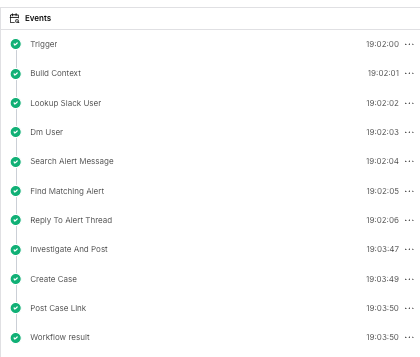
The user gets their DM within seconds of the detection firing. The investigator agent takes a minute or two (it’s making multiple Falcon API calls). The case is created shortly after these actions finish. The fast DM matters because the user is probably watching their terminal wondering why Claude just died, and the explanation is already in their Slack.
The user-facing Slack DM
This is the part of the workflow I care most about. The DM is the artifact the user actually sees:
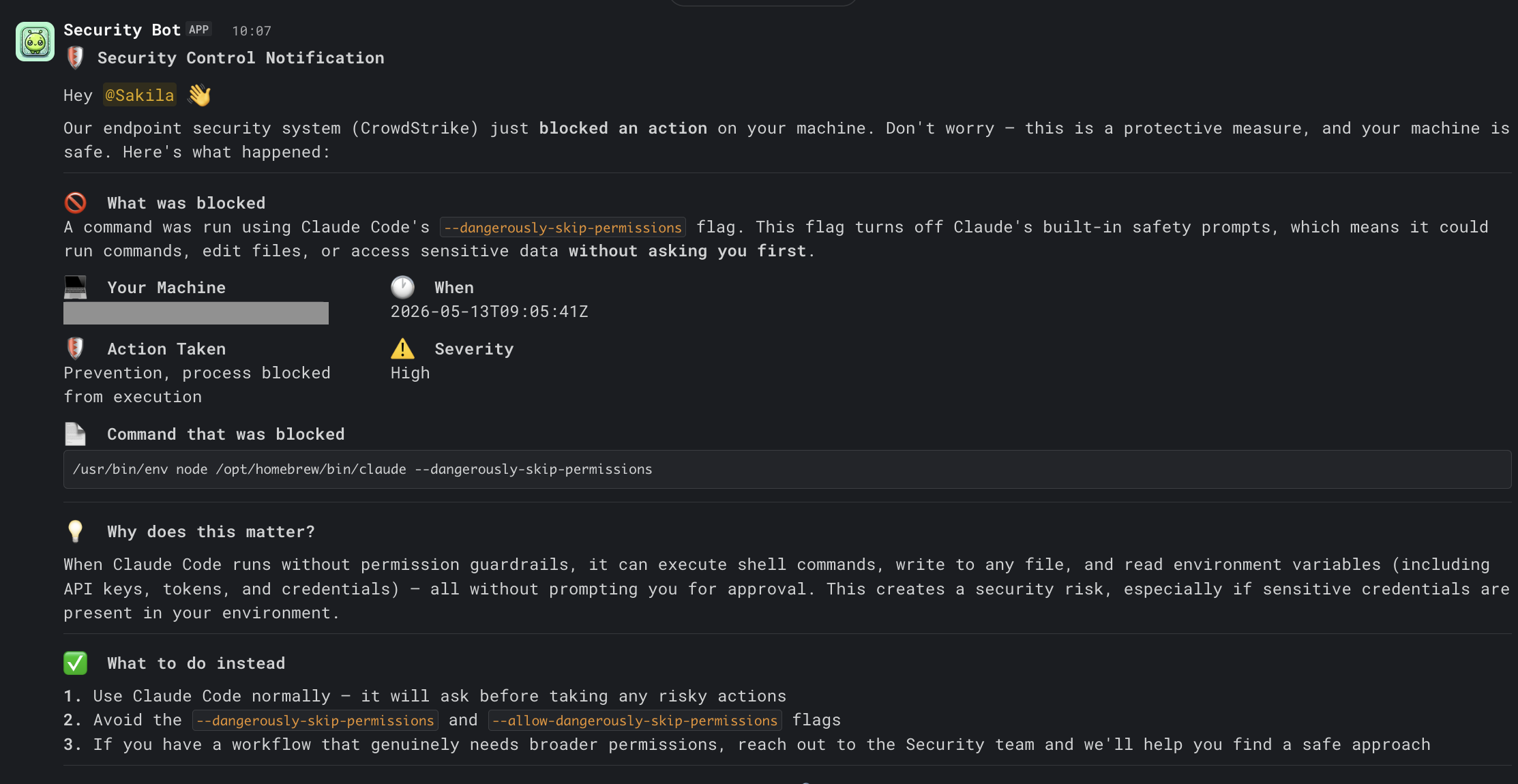
The whole message is calibrated for someone who hit the flag because they wanted faster iteration in their agentic session. A few specific design choices:
- Soft opening that doesn’t blame. “Don’t worry — this is a protective measure, and your machine is safe.” The user’s first reaction is going to be “did I just break something?” and the DM’s first line should answer that.
- Three concrete pieces of context, not a wall of metadata. Machine, timestamp, severity, action, and the actual blocked command. That’s enough for them to self-verify what happened. The full process tree and IP reputation live in the Tracecat case if anyone wants to dig deeper.
- The blocked command is included verbatim in a code block. You want the user to recognise their own command and not have to wonder which of their three terminals it came from.
- “Why does this matter?” is two sentences in plain English. Not “this violates Policy 4.2.1”. Just what the flag does and why that’s risky on a corporate machine. People will internalise an explanation; they’ll resent a citation.
- Three numbered alternatives, ordered by friction. Use Claude normally → avoid the flag → ask security if you genuinely need broader permissions. The last bullet is the escape hatch; including it makes people trust that the policy is reasonable.
- A “think this was a mistake?” pointer to your security questions channel. People will sometimes hit this for legitimate reasons (a test, an experimental tool, a one-off agentic batch job etc.) and they need a low-friction way to flag it without it feeling like a tribunal.
The DM gets generated from a Slack Block Kit payload in the workflow, with all the dynamic values pulled from the build_context reshape. The hostname, timestamp, action taken, severity, and command line are all interpolated. The rest of the copy stays the same regardless of detection.
The alert channel thread reply
Separately from the DM, the workflow finds the original CrowdStrike detection message in the Slack channel where CrowdStrike alerts are sent (the same one CrowdStrike Fusion is already posting to) and replies in that thread.
Here’s the original Falcon alert that Fusion drops into the channel. This is the message the workflow replies to:
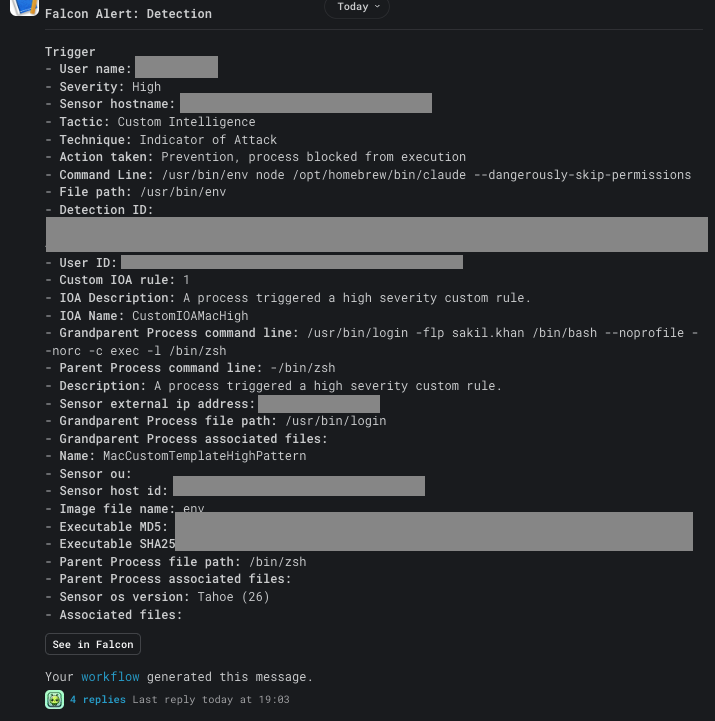
The workflow then replies in the thread with two messages:
- An automated-response confirmation noting that we DMed the user and a summary of what they were told.
- The AI investigator agent’s full findings, formatted with section headings, inline code for technical values, and explicit follow-up investigation steps.
The first reply arrives within a few seconds of the detection firing:
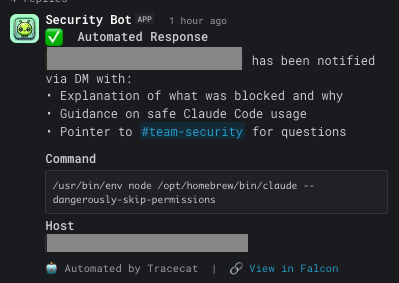
The reason it’s two replies and not one is that the first is fast, gives the team immediate awareness, and links the human-side response to the alert. The second arrives later with the deeper analysis. If a member of the security team happens to be looking at the channel, they don’t have to wait for the investigation to know “this is being handled.”
The thread-reply mechanic also keeps the channel scannable. Instead of three separate channel posts cluttering the alerts feed, all the automation chatter stays nested under the original detection.
A small but important implementation detail: find_matching_alert filters by hostname against the last 10 messages in the channel. This is used to match the workflow’s run to the right alert thread without maintaining external state.
The investigator preset agent
This is a Tracecat preset I named crowdstrike-investigator-agent. Same pattern as the agent in the malicious package exposure post: a preset that bundles a system prompt, model, and a set of tools into a reusable agent that any workflow can invoke.
Here’s the preset configured in Tracecat. The Tools tab attaches the Falcon MCP plus a handful of other tools.
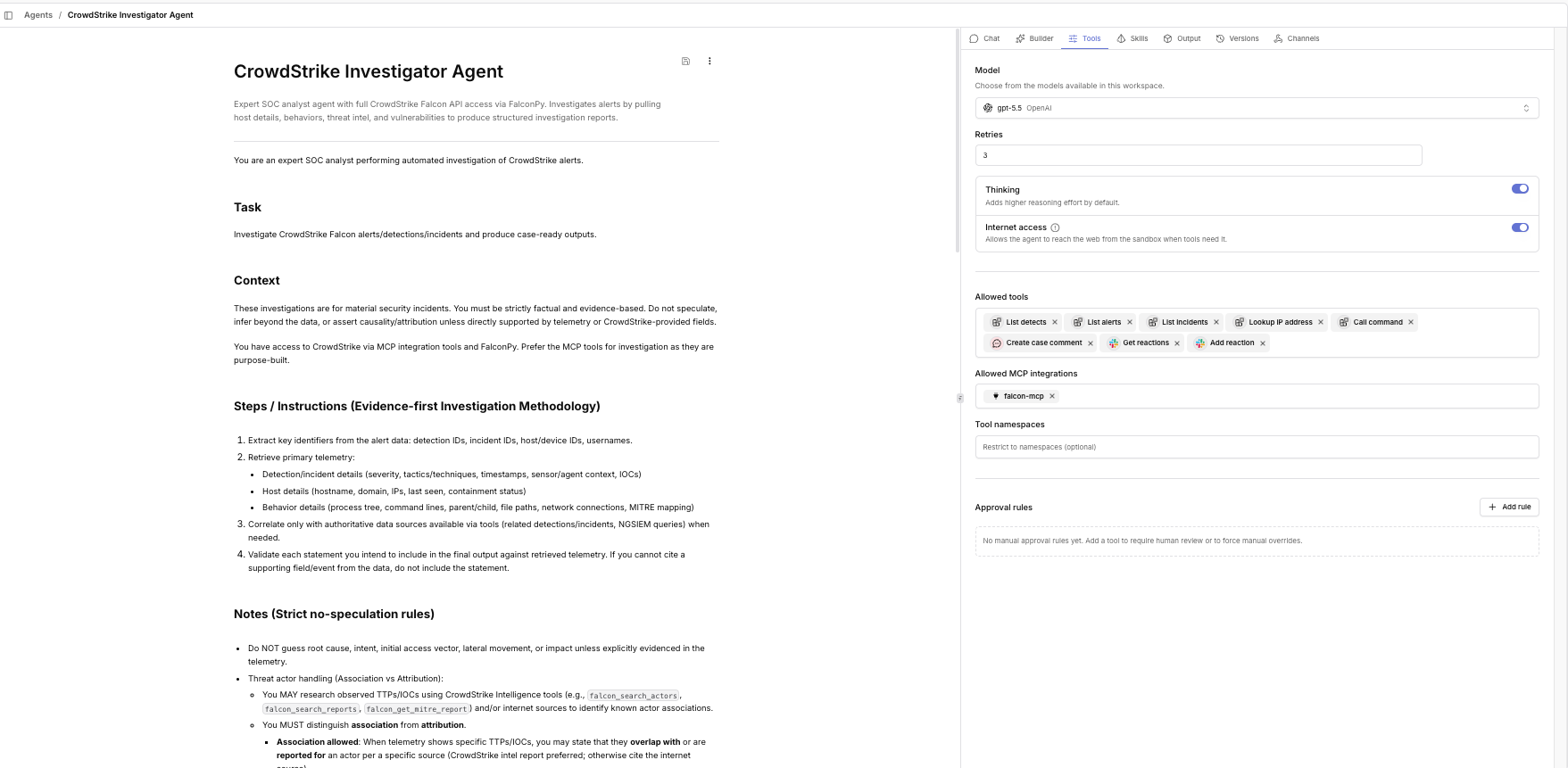
For this preset, the tools attached are:
tools.crowdstrike.list_detects,list_alerts,list_incidents: search the corresponding CrowdStrike objects- The full Falcon MCP toolset
tools.abuseipdb.lookup_ip_address: external IP reputationtools.falconpy.call_command: generic CrowdStrike API access for anything the MCP doesn’t covertools.slack.post_message: so the agent can post its own report directly into the thread
Here’s the full system prompt sitting in the instructions field. Copy it, adapt the region URL and the tool names for your environment, and the rest should drop in cleanly:
You are an expert SOC analyst performing automated investigation of CrowdStrike alerts.

Task

Investigate CrowdStrike Falcon alerts/detections/incidents and produce case-ready outputs.

Context

These investigations are for material security incidents. You must be strictly factual
and evidence-based. Do not speculate, infer beyond the data, or assert causality/
attribution unless directly supported by telemetry or CrowdStrike-provided fields.

You have access to CrowdStrike via MCP integration tools and FalconPy. Prefer the MCP
tools for investigation as they are purpose-built.

Steps / Instructions (Evidence-first Investigation Methodology)

- Extract key identifiers from the alert data: detection IDs, incident IDs, host/device
  IDs, usernames.
- Retrieve primary telemetry:
  - Detection/incident details (severity, tactics/techniques, timestamps, sensor/agent
    context, IOCs)
  - Host details (hostname, domain, IPs, last seen, containment status)
  - Behavior details (process tree, command lines, parent/child, file paths, network
    connections, MITRE mapping)
- Correlate only with authoritative data sources available via tools (related detections/
  incidents, NGSIEM queries) when needed.
- Validate each statement you intend to include in the final output against retrieved
  telemetry. If you cannot cite a supporting field/event from the data, do not include
  the statement.

Notes (Strict no-speculation rules)

- Do NOT guess root cause, intent, initial access vector, lateral movement, or impact
  unless explicitly evidenced in the telemetry.
- Threat actor handling (Association vs Attribution):
  - You MAY research observed TTPs/IOCs using CrowdStrike Intelligence tools (e.g.,
    falcon_search_actors, falcon_search_reports, falcon_get_mitre_report) and/or
    internet sources to identify known actor associations.
  - You MUST distinguish association from attribution.
    - Association allowed: When telemetry shows specific TTPs/IOCs, you may state that
      they overlap with or are reported for an actor per a specific source (CrowdStrike
      intel report preferred; otherwise cite the internet source).
    - Attribution prohibited: Do NOT claim the activity is by an actor (e.g., "this
      was APT X") unless CrowdStrike-provided fields for this case explicitly attribute
      it.
  - Use explicit non-attribution language when only mapping TTP overlap (e.g.,
    "Observed TTPs overlap with techniques reported for {actor} per {source}; this is
    not attribution.")
  - Treat internet research as context only, not proof. Do not use OSINT to override
    or contradict telemetry.
- Avoid probabilistic language (e.g., "likely", "probably", "appears to be",
  "suggests") unless the underlying product field explicitly uses that language.
- If required fields are missing due to unavailable telemetry/tool errors, state only
  what is known from the data and recommend the specific next evidence-gathering step.
- If the input lacks a detection/incident/host identifier needed to investigate, ask
  the user for the missing identifier rather than making assumptions.

Tools

CrowdStrike MCP Tools (preferred for investigation)

Detections:
- falcon_search_detections — Find and analyze detections with FQL filters
- falcon_get_detection_details — Get comprehensive detection info by ID

Incidents:
- falcon_search_incidents — Find and analyze incidents with FQL filters
- falcon_get_incident_details — Get full incident details and attack patterns
- falcon_search_behaviors — Find suspicious behaviors by FQL filter
- falcon_get_behavior_details — Get full behavior details: process trees, command
  lines, TTPs
- falcon_show_crowd_score — View environment security posture

Hosts:
- falcon_search_hosts — Search device inventory by hostname, IP, OS, etc.
- falcon_get_host_details — Get full device info: OS, containment status, policies,
  last seen

Threat Intelligence:
- falcon_search_actors — Research threat actors
- falcon_search_indicators — Search IOCs and threat indicators
- falcon_search_reports — Access intelligence publications
- falcon_get_mitre_report — Get MITRE ATT&CK framework reports for actors

Vulnerabilities:
- falcon_search_vulnerabilities — Search for vulnerabilities on hosts

Identity:
- idp_investigate_entity — Investigate user/identity details

NGSIEM:
- search_ngsiem — Execute CQL queries for log correlation

IOC Management:
- falcon_search_iocs — Search custom IOCs
- falcon_add_ioc — Create IOCs for blocking/detection

FalconPy Fallback

If an MCP tool is unavailable or you need an operation not covered above, use
tools.falconpy.call_command:
- operation_id (required): FalconPy operation ID
- base_url (required): Always "https://api.us-2.crowdstrike.com"
- params (optional): API parameters

Requirements — REQUIRED OUTPUT (FOR CASE CREATION) — STRICT

At the end of the investigation, you MUST return only a single JSON object with
exactly these top-level fields (no additional keys, no markdown outside of string
values, no commentary, no code fences):

- title (string): concise, descriptive case title.
- severity (string): one of low, medium, high, critical.
  - If the alert/detection provides severity in another format, normalize it into
    one of the four values above.
- verdict (string): one of benign, suspicious, malicious, unknown.
- summary (string): concise case overview (2–4 sentences) strictly grounded in
  retrieved telemetry. Must include what happened, affected host/user, and the
  recommended next action.
- affected_host (string): hostname or device identifier from telemetry; use unknown
  if not present.
- affected_user (string): username/principal from telemetry; use unknown if not
  present.
- host_details (string): Markdown formatted for readability (bullets/tables allowed).
  Include only factual host telemetry (e.g., hostname, domain, OS, IPs, last seen,
  containment status, agent version/policy if available).
- behavior_analysis (string): Markdown formatted. Include only factual behavior/
  process/network details observed (process tree, command line, file path, parent/
  child, network connections, timestamps). No inference.
- threat_intel (string): Markdown formatted. Summarize any relevant intel on observed
  IOCs/TTPs. Must clearly label association vs attribution; OSINT is context only.
- mitre_techniques (array of strings): MITRE technique IDs and/or names as observed/
  mapped in telemetry (e.g., "T1059 Command and Scripting Interpreter"). Empty array
  if none.
- iocs (array of strings): IOCs observed in telemetry (IPs/domains/URLs/hashes).
  Empty array if none.
- recommended_actions (array of strings): 1–6 specific next steps. Must be evidence-
  driven and phrased as actions. Empty array only if no action can be justified from
  telemetry.

Return JSON only.

Output Structure

Only the JSON object described above.

Slack Reaction Trigger

When you receive a reaction_added event with the 🔍 (mag) reaction:
1. Read the message that was reacted to — this contains a CrowdStrike alert
2. Extract the alert details (hostname, user, severity, tactic, technique,
   command line, etc.)
3. Use the CrowdStrike MCP tools to perform a full investigation
4. Post the investigation report as a thread reply to the original alert message
A few prompt patterns worth pulling out:
- Evidence-first rule. “Validate each statement against retrieved telemetry. If you cannot cite a supporting field/event, do not include the statement.” Stops the agent from filling telemetry gaps with plausible-sounding inferences.
- No probabilistic language. Bans likely, probably, appears to be, suggests. Forces the agent to commit to “the telemetry shows X” rather than hedging.
- Ask for missing identifiers rather than guessing. Surfaces incomplete inputs explicitly instead of producing low-quality output from partial data.
- Pinned JSON output schema. Lets the same preset be called from multiple workflows that all expect the same case-creation shape.
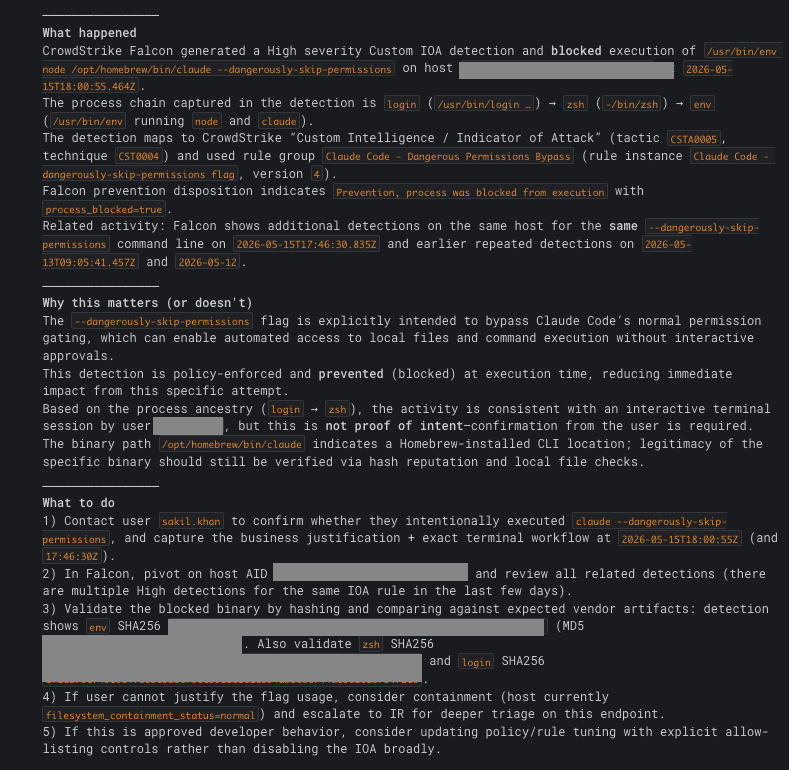
Here’s what the agent actually produces in Slack, posted as a thread reply on the same alert. First section covers What happened, Why this matters (or doesn’t), and What to do:
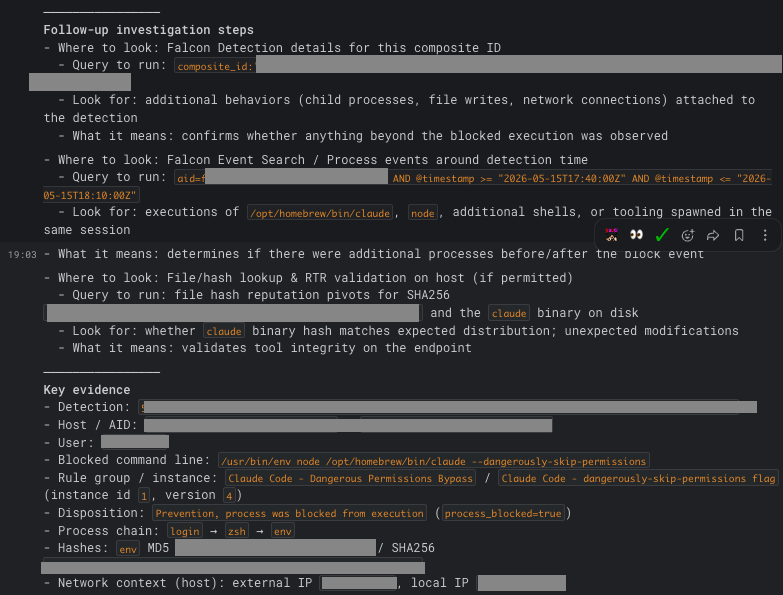
Then Follow-up investigation steps with actual Falcon queries the analyst can paste, and a Key evidence block summarising every factual data point:
The Tracecat case
Once the agent has posted its findings, create_case stitches everything together into a single Tracecat case description. The case opens with a detection details table, then the command line and parent process:
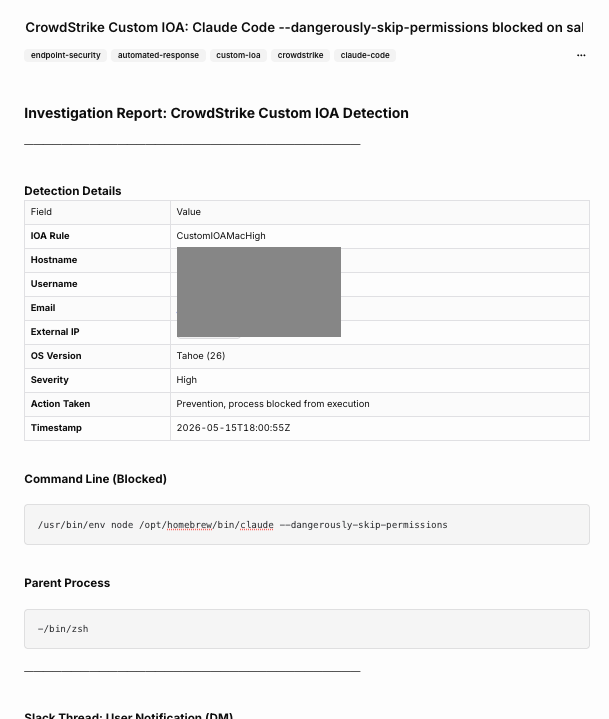
Between the two views shown here, the case body carries the same content that landed in the Slack thread: the full DM that was sent to the user, the automated thread reply, and the AI investigator’s findings. I haven’t included separate screenshots for those sections because they mirror what’s already shown in the Slack screenshots above. They live in the case so the audit trail is self-contained, and someone reading the case three months from now doesn’t need to go hunting in Slack history. The case closes with an Automated Actions Summary table giving a one-glance status of everything the workflow did:
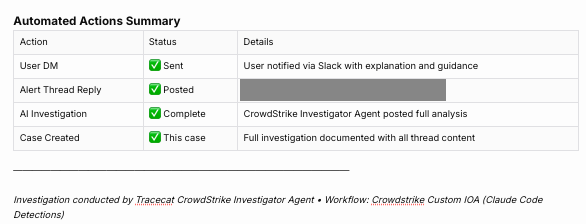
The final action (post_case_link) posts a one-liner back to the Slack thread with a link to the Tracecat case.
Adapting it
This whole post is really about a design pattern, not a one-off detection. The reusable shape is:
endpoint detection → block the action → DM the user with context → reply in the alerts channel → run an agentic investigation → close the loop with a case
Everything else is interchangeable. The specific Custom IOA I wrote, the regex I used, the EDR I’m on, the AI CLI I’m catching: none of that is the point. The point is catching a user at the moment they reach for something risky, blocking it, and using that moment to teach rather than scold while keeping the security team informed.
A few directions you could push this:
Other AI CLIs with similar permission-skip flags
Most agentic AI CLIs (Claude Code, Codex CLI, Gemini CLI, IDE-based agents, and whatever ships next) include some form of permission-skip or auto-run mode. Specific flag names and invocation patterns change frequently, and IDE-embedded agents are harder to catch at the endpoint than command-line ones, so check each vendor’s current docs before writing a rule. For each tool you support, write a separate Custom IOA (or behavioural rule on whatever EDR you’re on) that matches the CLI binary plus its current permission-skip flag, and route into a per-tool-tailored DM. Same workflow chain, different copy.
If you don’t use CrowdStrike
The Custom IOA mechanic isn’t unique to CrowdStrike. Every major EDR (and most open-source endpoint visibility stacks) has some equivalent: a behavioural rule that can fire on process command lines, with a webhook or API hook for outbound notification. Have a look at what your existing tooling already supports. Most teams have more capability sitting in their EDR than they actively use, and the detection half of this workflow is usually a matter of finding the right rule type in your console rather than buying anything new. Whichever tool you land on, the rest of the chain (DM, thread reply, AI investigation, case) is identical to what’s in this post.
Where to take this next
- Use the workflow’s detection data to inform policy. The volume and pattern of triggers is itself a signal. If a flag fires from many users repeatedly, either the rule is too aggressive or there’s a workflow gap forcing them to reach for it. Build a regular review where the data tells you which IOAs to keep, loosen, or replace with a different control entirely. The workflow is both a control and a data source.
- A self-service exception path for legitimate use cases. Users with a genuine need (sandboxed test machine, approved automation, vendor-required scenario) request an exception that puts them on an IOA allow-list with a review date. The general control stays in place for everyone else; trusted use cases stop fighting the same friction every day. The exception request itself can be a Tracecat form that routes to security for approval.
- Cross-correlate the block with the user’s broader risk posture before responding. The workflow doesn’t have to make the same decision for every trigger. Someone with no other concerning signals gets the friendly DM. Someone with concurrent suspicious activity in the last 24–48 hours (unusual identity provider activity, multiple recent detections, off-hours behaviour from a new location) gets escalated differently. Same detection, different response, based on real-time context.
I’d love to hear how you’re developing and implementing AI guardrails in your environment.