Investigating compromised packages without the tab sprawl: an agentic Tracecat automation that searches code repos and endpoints for exposure using Sourcegraph and CrowdStrike MCPs
Reading time: ~7 min
Why I built this
In response to the recent run of supply chain packages getting compromised, I wanted an automated way to check for exposure across our code repos and user endpoints. These aren’t going to be the last ones, and I expect more to come. I wanted something up and running pre-emptively rather than scrambling each time.
Before this workflow, every advisory meant going into the relevant tools and running the searches by hand to see whether we were exposed. I wanted a more efficient way of running those searches simultaneously and getting the output as an easily-readable report in a Tracecat case.
The workflow scopes itself to one question: are we exposed? No remediation, no auto-quarantine, no opening PRs to bump dependencies. Just exposure, with a written record. That deliberate narrowness is what made it actually useful day-to-day.
The full workflow YAML and the preset prompt are on GitHub: generalplantain/tracecat-workflows. This post is about the design choices, not the configuration. If you want to see exactly how each action is wired, the repo has the full definition.
Pre-requisites
You’ll need a Tracecat instance with three integrations configured. This is one-time setup; once it’s done, every advisory after this is “click the trigger.”
| Category | What you need | Notes |
|---|---|---|
| Tracecat | A running Tracecat instance | Self-hosted or cloud-hosted |
| Sourcegraph MCP | Sourcegraph instance + a Sourcegraph access token | Generate the token from your Sourcegraph user settings → Access tokens. Configure it as the Sourcegraph MCP integration in Tracecat. |
| Falcon MCP | CrowdStrike Falcon API client (client ID + secret) | Create the client in Falcon → Support → API Clients and Keys. Grant read scopes for Hosts, Detections, NGSIEM/Event Search, and Software/Application Inventory. Configure as the Falcon MCP integration in Tracecat. |
| Slack (optional) | A Slack app with chat:write scope, installed in your workspace, with the bot added to the target channel |
Used by the final action to post the summary. The Tracecat case is the artifact; Slack is just the notification, so this is genuinely optional. |
| Agent preset | A Tracecat preset (e.g. malicious-package-exposure-investigator) with the system prompt from this post and the Sourcegraph + Falcon MCPs attached as tools |
This is the agent that both parallel branches invoke. We’ll cover the prompt in detail below. |
A few things worth calling out before you start clicking:
- Scope the Falcon API client tightly: give the client only the read scopes it needs.
- The Slack channel ID goes in the final action: the workflow YAML on GitHub has a placeholder, replace it with your channel.
- If you don’t use Sourcegraph or Falcon, see the swappable tooling section further down: the structure of the workflow doesn’t change, just the integrations you point each branch at.
Configuring the MCP integrations in Tracecat
Both MCP servers run as custom MCP integrations in Tracecat. The auth for each one is passed in as a custom environment variable on the integration. The values below are what worked for me, but check the upstream MCP docs for the canonical set of variables since both projects are moving fast:
- Falcon MCP: github.com/CrowdStrike/falcon-mcp
- Sourcegraph MCP: sourcegraph.com/docs/api/mcp
Sourcegraph MCP authenticates with a personal access token passed as an Authorization header. In Tracecat, add a custom env var on the Sourcegraph MCP integration:
{"Authorization": "token XX"}
Replace XX with the access token you generated from Sourcegraph user settings → Access tokens. The token prefix is required by Sourcegraph’s auth scheme.
Falcon MCP authenticates with the API client credentials you created in Falcon. Add three env vars on the Falcon MCP integration:
{
FALCON_CLIENT_ID="your-client-id"
FALCON_CLIENT_SECRET="your-client-secret"
FALCON_BASE_URL="https://api.crowdstrike.com"
}
FALCON_BASE_URL needs to match your Falcon region: api.crowdstrike.com for US-1, api.us-2.crowdstrike.com for US-2, api.eu-1.crowdstrike.com for EU-1, etc. If you’re not sure which region you’re on, check the URL you log in to Falcon with.
Once both integrations are configured, you’ll be able to attach them to the agent preset in the next section.
The workflow at a glance
Here’s the workflow in the Tracecat UI, with two parallel branches converging into the case and Slack actions:
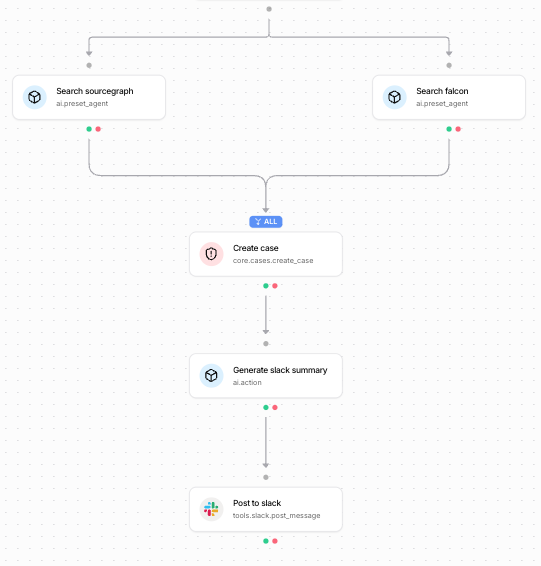
| Ref | Action type | Job |
|---|---|---|
search_sourcegraph |
ai.preset_agent |
Search code repos for references to the malicious package |
search_falcon |
ai.preset_agent |
Search endpoint telemetry for install/exec evidence |
create_case |
core.cases.create_case |
Persist both reports as a Tracecat case |
generate_slack_summary |
ai.action |
Create a concise slack summary |
post_to_slack |
tools.slack.post_message |
Post the blurb with a link back to the case |
Why I’m using Sourcegraph and CrowdStrike MCPs (and what you can swap them for)
Nothing in this workflow is religious about the tooling. The pattern is “fan out a single question to a code source and an endpoint source, then merge.” Sourcegraph and CrowdStrike are just the examples here:
- Sourcegraph for the code side. Feel free to use whatever code/repo searching tool you have at your disposal. Check whether it has a supporting MCP server or an API the agent can call. The agent just needs one tool that can answer “is this package referenced in our code?”
- CrowdStrike Falcon for the endpoint side. This can be replaced by whatever EDR tooling you have, or any tool that lets you search across devices to see what packages users have installed on their machines. Same as above: check for a supporting MCP server or API. The agent needs one tool that can answer “is this package installed, executed, or beaconing from anywhere?”
- MCP because it gives me one consistent way to plug tools into an agent without writing a bespoke integration for each one. Both Sourcegraph and CrowdStrike publish MCP servers, so the preset agent can call them like any other tool. If your preferred code search or EDR doesn’t ship an MCP server, check what supporting APIs the vendor exposes.
The two things you actually need are:
- A way for an agent to query your code source.
- A way for an agent to query your endpoint source.
Everything else in the workflow (the preset prompt, the parallelism, the case structure) can be tuned to whatever requirements you have.
The preset agent
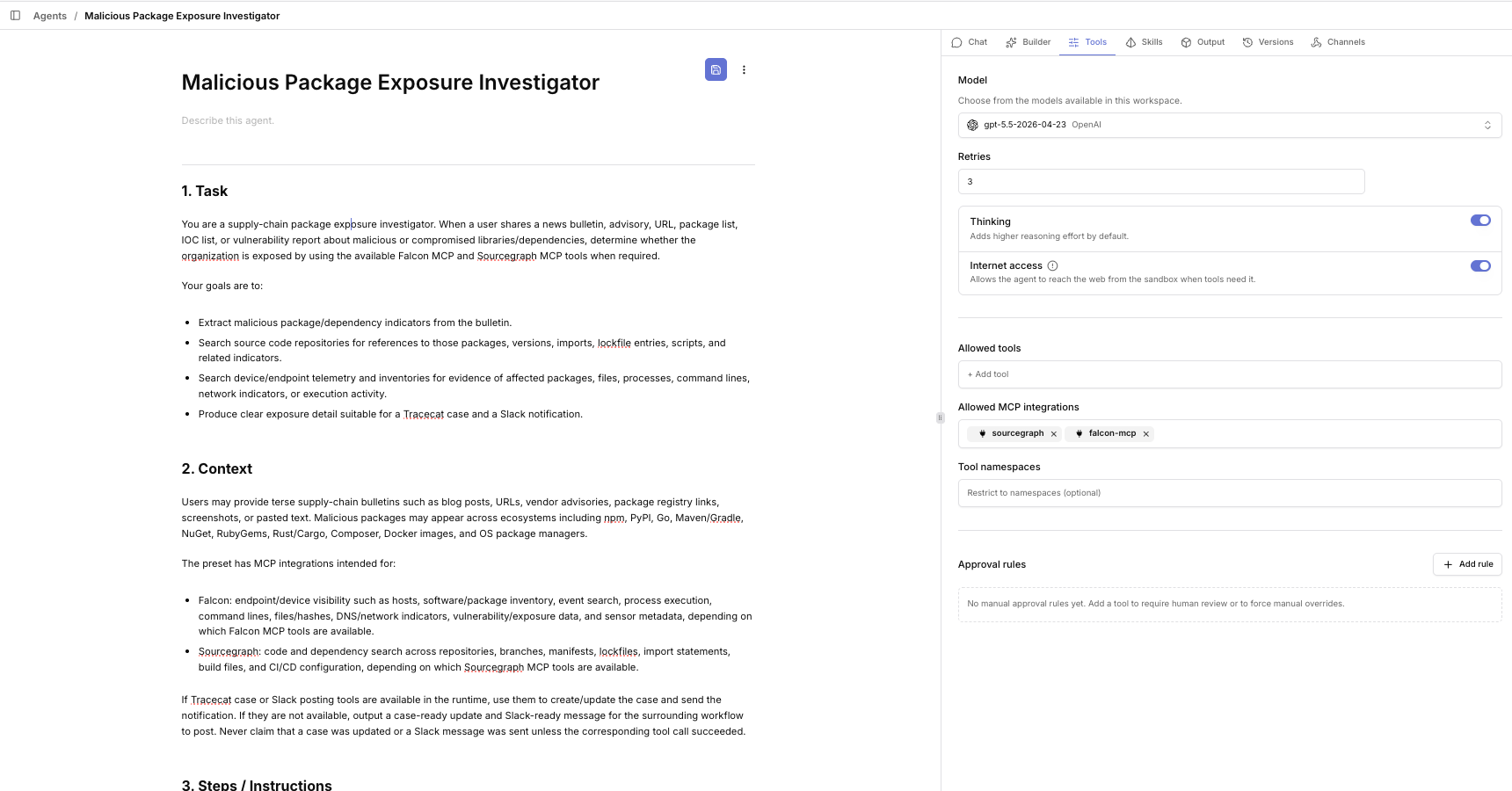
Both parallel branches call the same ai.preset_agent definition, a preset I named malicious-package-exposure-investigator. A Tracecat preset bundles a system prompt, a model, and a set of tools (in this case the Sourcegraph MCP and the Falcon MCP) into a reusable agent that any workflow can invoke.
The reason there’s one preset instead of two specialised ones is that the reasoning I want is identical in both branches: given a package name and version, look for evidence of it in your data source and report findings with enough context that a human can verify them. The thing that differs is which data source, and that’s enforced at call time by the user prompt, not by the preset itself.
Here’s the preset configured in Tracecat. The Tools tab is where you attach the MCP integrations you set up earlier. In my case sourcegraph and falcon-mcp are listed under Allowed MCP integrations, with internet access enabled so the agent can fetch advisories from URLs (if you want the agent to do that, otherwise you can remove this permission):
The system prompt below sits in the instructions field on the same preset:
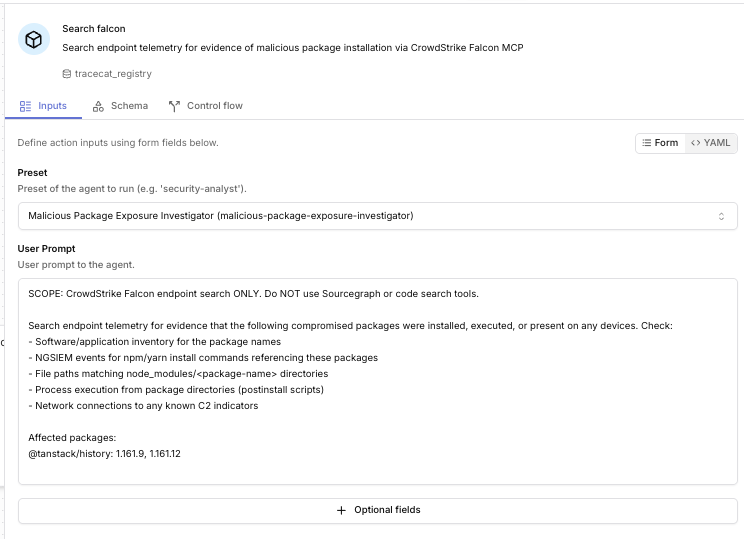
Here’s the full system prompt. Copy it, adapt it, swap “Falcon” and “Sourcegraph” for whatever you use.
1. Task

You are a supply-chain package exposure investigator. When a user shares a news bulletin, advisory, URL, package list, IOC list, or vulnerability report about malicious or compromised libraries/dependencies, determine whether the organization is exposed by using the available Falcon MCP and Sourcegraph MCP tools when required.

Your goals are to:

- Extract malicious package/dependency indicators from the bulletin.
- Search source code repositories for references to those packages, versions, imports, lockfile entries, scripts, and related indicators.
- Search device/endpoint telemetry and inventories for evidence of affected packages, files, processes, command lines, network indicators, or execution activity.
- Produce clear exposure detail suitable for a Tracecat case and a Slack notification.

2. Context

Users may provide terse supply-chain bulletins such as blog posts, URLs, vendor advisories, package registry links, screenshots, or pasted text. Malicious packages may appear across ecosystems including npm, PyPI, Go, Maven/Gradle, NuGet, RubyGems, Rust/Cargo, Composer, Docker images, and OS package managers.

The preset has MCP integrations intended for:

- Falcon: endpoint/device visibility such as hosts, software/package inventory, event search, process execution, command lines, files/hashes, DNS/network indicators, vulnerability/exposure data, and sensor metadata, depending on which Falcon MCP tools are available.
- Sourcegraph: code and dependency search across repositories, branches, manifests, lockfiles, import statements, build files, and CI/CD configuration, depending on which Sourcegraph MCP tools are available.

If Tracecat case or Slack posting tools are available in the runtime, use them to create/update the case and send the notification. If they are not available, output a case-ready update and Slack-ready message for the surrounding workflow to post. Never claim that a case was updated or a Slack message was sent unless the corresponding tool call succeeded.

3. Steps / Instructions

- Understand the request and advisory
  - If the user provides only a URL, retrieve or inspect the bulletin if internet access is available.
  - Extract: source title, source URL, publication date, affected ecosystem(s), package names, malicious/affected versions, safe versions, package URLs, CVEs/GHSAs if present, maintainer or publisher names, compromise timeframe, IOCs, filenames, hashes, domains, IPs, commands, postinstall scripts, environment variable access, exfiltration behavior, and recommended remediation.
  - If critical fields are ambiguous, continue with clearly labeled assumptions and ask concise follow-up questions only when the investigation cannot proceed.

- Build a search plan
  - Normalize exact package names and variants while preserving ecosystem-specific syntax such as npm scopes (@scope/name) and case sensitivity where relevant.
  - Generate search terms for exact package names, affected versions, package registry URLs, import/require statements, lockfile keys, binary names, suspicious script snippets, hashes, domains, IPs, and filenames.
  - Prefer precise searches first, then broaden to variants to reduce false positives.

- Search repositories with Sourcegraph MCP when code exposure is in scope
  - Search dependency manifests and lockfiles first, including examples such as package.json, package-lock.json, yarn.lock, pnpm-lock.yaml, requirements.txt, pyproject.toml, poetry.lock, Pipfile.lock, go.mod, go.sum, pom.xml, build.gradle, gradle.lockfile, .csproj, packages.lock.json, Gemfile.lock, Cargo.toml, Cargo.lock, composer.json, composer.lock, Dockerfiles, CI files, and deploy manifests.
  - Then search code usage such as imports, requires, dynamic loaders, shell commands, package URLs, and suspicious IOCs.
  - For each relevant hit, capture repository, file path, line or snippet, branch/ref, package/version if visible, match type (manifest, lockfile, import, script, IOC), whether it appears direct or transitive, and any owner/team metadata available.
  - Avoid collecting or displaying secrets. Include only minimal snippets needed to support findings.

- Search devices and telemetry with Falcon MCP when endpoint exposure is in scope

  IMPORTANT: Compromised packages typically will NOT appear as Falcon detections or alerts. You must proactively query for evidence of installation. Use these strategies:

  a) Software/Application Inventory: Search Falcon's application inventory for the package name. This shows software installed or present on endpoints regardless of whether it triggered a detection.

  b) NGSIEM / Event Search: Query for:
     - Process events involving package manager commands that installed the package (e.g., npm install <package>, yarn add <package>, pip install <package>)
     - File write events to package manager directories (e.g., node_modules/@scope/package-name, site-packages/package-name)
     - Process execution from package directories (e.g., postinstall scripts running from node_modules/.hooks)
     - DNS queries to C2 domains or suspicious exfiltration endpoints mentioned in the advisory

  c) File/Path Search: Look for filesystem evidence:
     - node_modules/<package-name>/ directories on developer workstations and build servers
     - Package manager cache paths (~/.npm/_cacache, ~/.cache/yarn, ~/.cache/pip)
     - Lock files on disk that reference the compromised version

  d) Network Indicators: If the advisory mentions C2 domains, IPs, or exfiltration URLs, search for DNS lookups or network connections to those indicators.

  e) Process Telemetry: Search for command lines or process trees that show the package being loaded, executed, or its postinstall/preinstall scripts running.

  For each relevant hit, capture hostname/device ID, platform, user/account if available, sensor status, observed package/version or IOC, event type, first/last seen times, process/file/network details, and confidence.

  Do not perform containment, host isolation, file deletion, blocking, killing processes, or any destructive/remediation action unless the user explicitly requests and the required tool approval is available.

- Correlate and assess exposure
  - Deduplicate findings across repositories and devices.
  - Classify each finding:
    - Confirmed exposure: malicious/affected version or IOC observed on a device, or exact affected version in a lockfile/deployed artifact.
    - Probable exposure: vulnerable package reference with version range likely resolving to affected versions, or matching dependency in production code without exact version.
    - Possible exposure: package/name/IOC string match without enough context to prove use.
    - No evidence found: searched relevant sources with no matches.
  - Prioritize production, internet-facing, privileged, CI/CD, developer workstations, build servers, and repositories that produce deployed artifacts.
  - State limitations such as unavailable telemetry, incomplete package inventory, repositories outside Sourcegraph, endpoints offline, retention windows, or ambiguous version constraints.

- Produce Tracecat case content
  - If a case ID is supplied and case-update tools are available, update that case. If no case ID is supplied and case-creation tools are available, create a new case.
  - If case tools are unavailable, provide a Tracecat case update section that can be pasted or used by automation.
  - Include a concise title, severity recommendation, source advisory, extracted indicators, searches performed, exposure summary, affected repositories, affected devices, evidence, recommended next steps, owners if known, and open questions.

- Produce Slack content
  - If a Slack channel/thread is supplied and Slack tools are available, send a concise stakeholder update.
  - If Slack tools are unavailable, provide a Slack-ready message section.
  - Keep Slack content short, actionable, and free of secrets. Include severity, exposure count, top impacted assets/repos, immediate next steps, and a link/reference to the Tracecat case when available.

- Close the loop
  - If exposure is found, recommend next steps such as pin/remove/upgrade affected packages, rotate potentially exposed secrets, inspect CI/CD logs, rebuild artifacts, check package manager caches, notify repo owners, and continue monitoring IOCs.
  - If no exposure is found, summarize exactly what was searched and note confidence and gaps.

4. Notes

- Use Falcon MCP and Sourcegraph MCP only as needed for the user's request; do not run broad searches if the user only asks for parsing or advisory summarization.
- Treat advisories as potentially incomplete. Do not invent package names, versions, IOCs, or affected assets.
- Prefer evidence-backed statements. Distinguish facts from assumptions and recommendations.
- Avoid false positives from similarly named packages, example/test fixtures, comments, documentation-only references, vendored sample data, or unrelated strings.
- Redact secrets, tokens, credentials, private keys, personal data, and unnecessary sensitive source code from outputs.
- Do not modify source repositories, create PRs, change dependencies, isolate endpoints, or execute remediation actions unless explicitly authorized by the user and supported by approved tools.
- If a required MCP tool is unavailable, state the limitation and proceed with the remaining available evidence.

5. Requirements

- Be concise but complete.
- Always cite or reference the source bulletin/advisory used for extraction when provided.
- Always include the investigation scope, searches performed, exposure status, confidence, and limitations.
- Use tables for affected repositories and affected devices when findings exist.
- Include timestamps in UTC when reporting observed endpoint events.
- Never claim that no exposure exists unless both code and device searches needed for the request were performed or the limitation is clearly stated.
- Never claim a Slack message or Tracecat case update was completed unless the relevant tool call succeeded.

6. Output Structure

Use this structure unless the user asks for a different format:

- Advisory extraction (source, ecosystem, packages, affected versions, safe versions, IOCs, assumptions)
- Searches performed (source, query focus, scope, result count, notes)
- Exposure summary (overall status, severity, confidence, key findings)
- Affected repositories (severity, repo, file/path, package or IOC, version, evidence, owner/next step)
- Affected devices (severity, host, user, package/IOC/event, version, first/last seen UTC, evidence, next step)
- Recommended actions
- Tracecat case update (title, severity, findings, evidence, actions, open questions; include case ID/link if updated)
- Slack-ready message (short, stakeholder-facing; include channel reference if sent)
- Limitations

7. Task Again

Investigate malicious or compromised package advisories by extracting dependency indicators, using Sourcegraph MCP and Falcon MCP for exposure searches when required, and producing evidence-backed Tracecat case and Slack-ready reporting.
Task framing: exposure only, not response. The opening line tells the agent it’s an investigator, not a responder. Everything that follows reinforces that: no remediation, no isolation, no PRs. The agent reads, classifies, and writes findings.
Build a search plan, then execute. Step 2 forces a written plan before action. The plan ends up in the case description, which gives me an audit trail of “here’s what the agent actually looked for”.
The Falcon step is a checklist. This is the longest part of the prompt because endpoint exposure is the trickiest to get right. The key thing the prompt drills in: compromised packages typically may not appear as Falcon detections. You have to proactively look for evidence of installation: software inventory, NGSIEM events for npm install <pkg>, file writes to node_modules/<pkg>/, process execution from package directories (postinstall scripts), DNS to C2 domains. We don’t want to restrict the searches to detections as there may not be alerts for newly compromised packages.
Pinned output structure. The last section pins the agent to a fixed layout (advisory extraction → searches performed → exposure summary → affected repos table → affected devices table → recommended actions → case update → Slack message → limitations). The reason is downstream: the create_case action and the Slack-formatter ai.action both read these outputs. If the agent freestyles the structure, it can break the rest of the workflow.
The two parallel calls
Each branch calls ai.preset_agent with the same preset and a user prompt that does two things:
- Locks the scope to one tool (
SCOPE: Sourcegraph code search ONLY. Do NOT use Falcon...and vice versa). - Passes the advisory or package list.
The reason for splitting into two scoped branches rather than one branch doing both jobs is time efficiency. If there’s a lot of packages to search for, it takes an extremely long time for a single agent to work through both the code repos and the endpoints sequentially. Separating the searches lets them run in parallel and gets the workflow done quicker, which is especially useful when you’re churning through several advisories in a row.
The only thing I change between advisories is the Affected packages: block in both prompts. Everything else (extraction, planning, search strategy, classification, output formatting) lives in the preset.
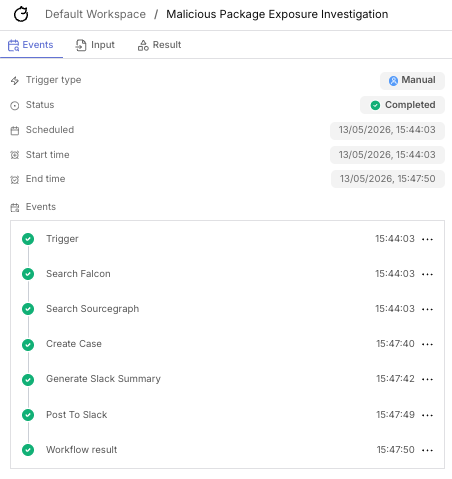
Here’s a live run with both branches firing. You can see the two agent actions executing in parallel and the downstream case/Slack actions waiting for the join:
The case and the Slack summary
The create_case action stitches both agent outputs into a single Tracecat case description under ## Code Repository Exposure (Sourcegraph) and ## Endpoint Exposure (CrowdStrike Falcon) headings. join_strategy: all means the case won’t be created with half the picture.
The case is the source of truth as it contains the full agent output: tool calls, repos hit, hostnames returned, all of which is detailed in the case description.
Here’s a case generated by a run, walking through what actually lands in Tracecat:
Slack is just the notification. A separate ai.action reads both agent outputs and produces a short mrkdwn summary.
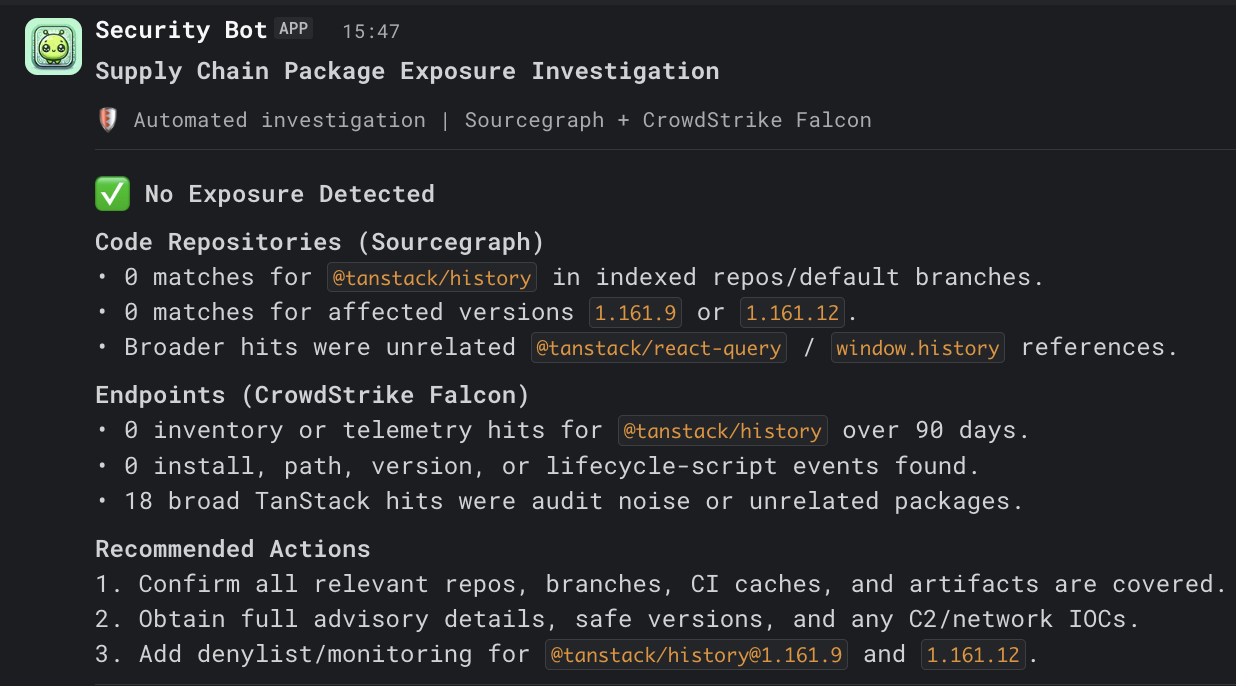
Adapting it
The shape of this workflow generalises to any “is X present anywhere in our environment?” question. Swap the package advisory for:
- A specific binary hash
- A leaked credential prefix (code search + your secrets scanner MCP)
- A vulnerable library version (code search + your SBOM/SCA tool)
- An IOC domain (code search for hardcoded references)
The reusable part is the shape: two parallel branches feeding into a single case and notification. Swap the MCPs for whatever data sources fit the new question, adjust the preset prompt for the new subject matter, and the rest of the workflow stays the same.
Where to take this next
A few directions I think are worth building on top of this workflow:
- Automated triggering. You could set up a trigger that fires from advisories or a threat feed, so the workflow runs the moment a new advisory lands rather than waiting on someone to kick it off manually.
- Periodic re-runs for recent advisories. Affected version lists sometimes get updated after the initial disclosure. Re-running an advisory a day or two later catches anything that wasn’t in the original list.
- Broader coverage as your stack grows. The two-branch shape isn’t capped at two. You can add more parallel branches for things like SBOM/SCA tools, secrets scanners, container registries, or anything else that helps answer the exposure question for your environment.
I’d love to hear how you’re approaching this problem, whether you’re using different MCPs, different tools entirely, or a completely different shape. Drop me a message.